

Overview
Matching rules tell Blnk how to match the two sets of records. They define how fields like amount, date, description, reference, etc. are compared to each other while accounting for slight variations (called drifts), In this guide, you’ll learn everything about matching rules and how to configure them for your reconciliation runs.Create a matching rule
To create a new matching rule: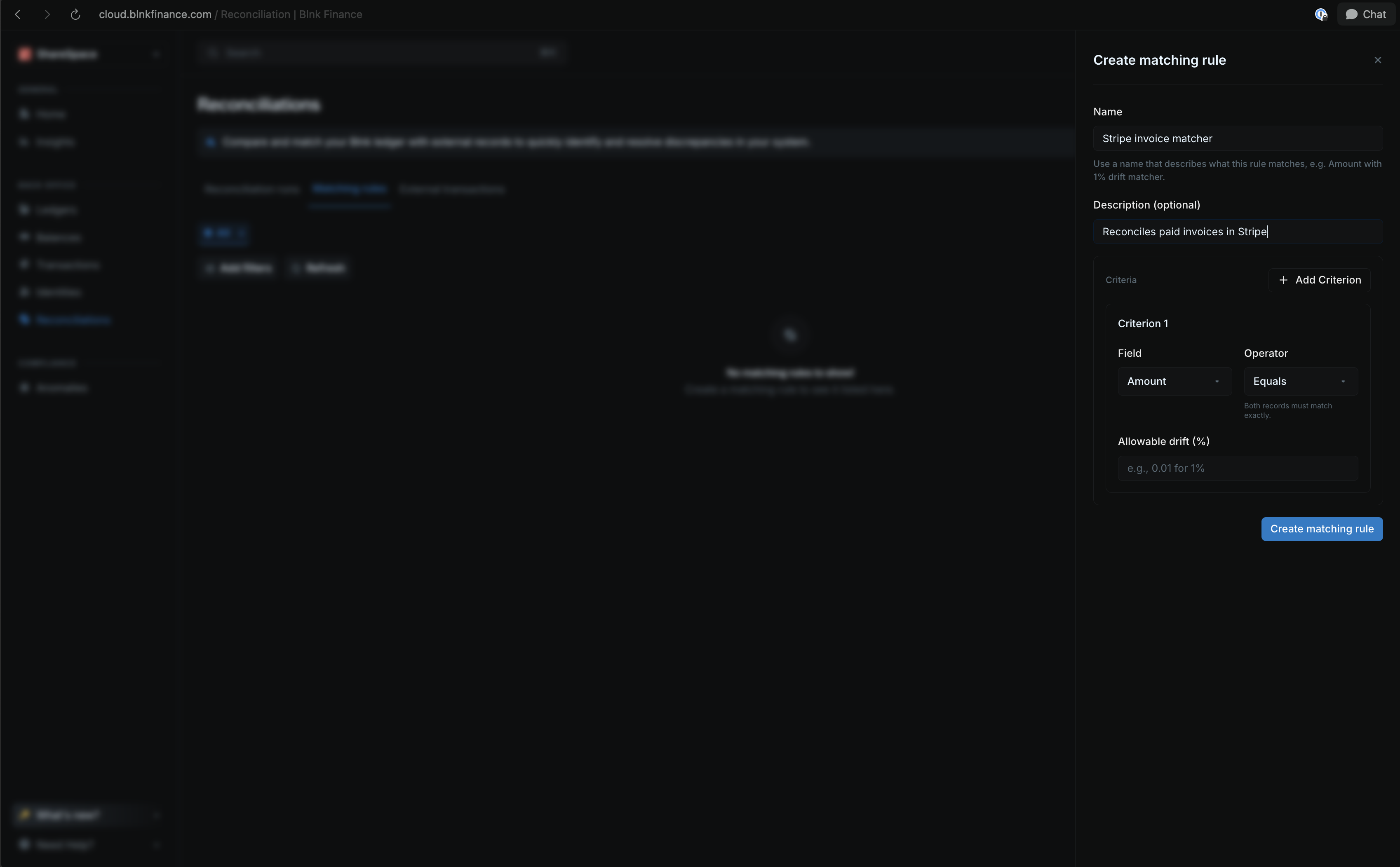
- Go to the Reconciliations page from your sidenav.
- Click on Matching rules from the top menu.
- Click on Create matching rule from the top right corner.
- Enter the required details:
- Name: The name of the matching rule.
- Description: A short description of the matching rule.
- Criteria: Fields to compare and match records.
- Once done, click Create matching rule to finish.
Setting up criteria
Matching rules are made of one or more criteria. With Blnk, you can define a rule with up to five criteria.. Each criterion is a field Blnk will compare across your external data and your ledger. When you set more than one criterion, Blnk will only match records that meet all the criteria.| Criteria | Operators | What it checks | Internal field |
|---|---|---|---|
| amount | equals, greater_than, less_than | Compares transaction amounts | amount |
| currency | equals | Ensures both transactions use the same currency | currency |
| date | equals, after, before | Compares transaction dates | created_at |
| reference | equals, contains | Checks for exact or partial reference matches | reference |
| description | equals, contains | Matches transactions by description | description |
Operators
Each attribute uses operators that define how strict the comparison should be.| Operator | Description |
|---|---|
| equals | Both records must match exactly |
| contains | The external value must appear as part of the internal value |
| greater_than | External amount is higher than the internal amount |
| less_than | External amount is lower than the internal amount |
| after | External date is later than the internal date |
| before | External date is earlier than the internal date |
Allowable drifts
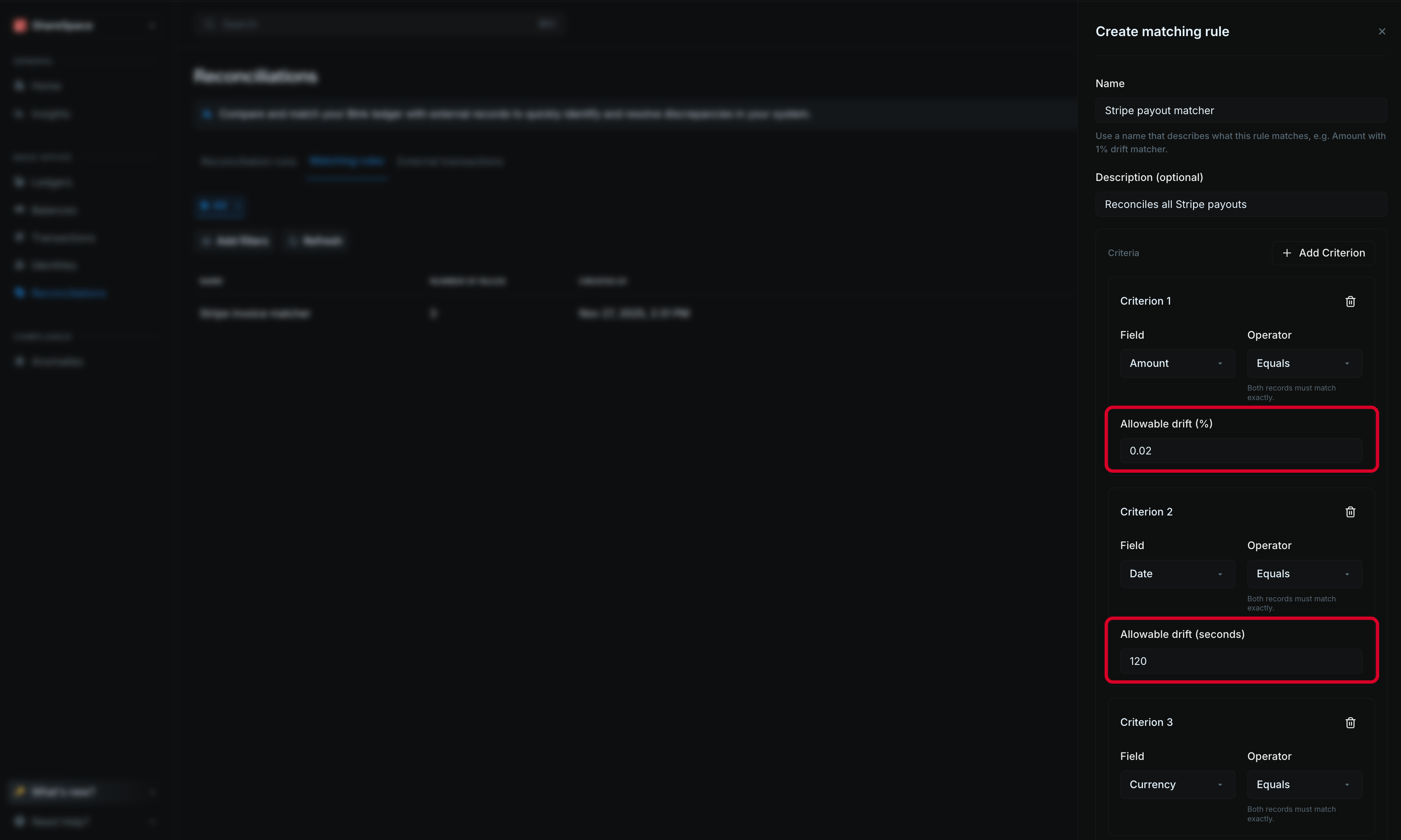
Whe comparing values like dates and amounts, Blnk allows you to set a tolerance for slight variations. This is calledallowable drift, best used with the equals operator.
-
Amount drift: Lets you allow small differences between the amounts in your ledger and the external file. The value you set is a percentage written as a decimal. For example, 0.01 means a 1 percent tolerance.
If the internal amount is $100 and you set a 1% drift, any external amount between $99 and $101 will be considered a match.
-
Date drift: Lets you allow time differences between the internal timestamp and the external one. The value you set is in seconds. For example, 3600 means a one hour tolerance.
If the internal record is 2:00 PM and you set a 1 hour drift, any external timestamp from 1:00 PM to 3:00 PM will be treated as a match.
When to use drifts
-
Use amount drift when:
- Your external data includes processing fees or minor exchange rate variations.
- Your system rounds transactions differently from external sources.
-
Use date drift when:
- Your transactions involve cross-time-zone processing.
- Payment settlements take hours or days to finalize.
Best practices
Blnk compares each internal record against your external data based on the matching rules you set. If your rules are too broad, a single external record can match multiple internal ones, which creates confusing results. To avoid this, use clear and specific criteria when creating your matching rules.- Use one or more distinct attributes in your matching rules, e.g. date and reference.
- For multi-currency systems, specify the currency in your matching rules to prevent mismatches with other currencies.
- Test your rules with a small sample of your data to ensure they work as expected.
- Depending on the source of your external data, you may need to set different rules for different sources.